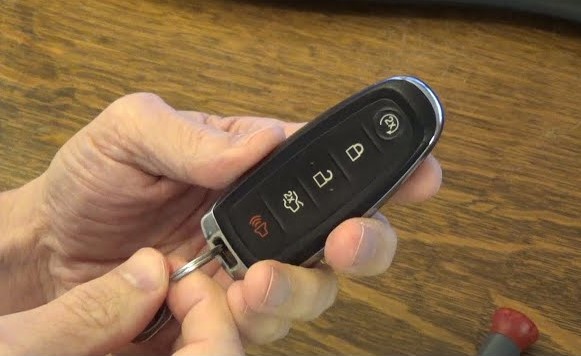
A Ford key fob makes daily driving effortless, unlocking doors and starting the engine with a single press. Over time, its battery loses strength, leaving you pressing buttons with no response.
A weak signal or complete failure often points to a simple fix replacing the battery. The process takes only a few minutes and requires minimal tools, yet many drivers overlook it until the fob stops working completely.
A fresh battery restores full range and responsiveness, saving you from unexpected lockouts or inconvenience. Learning how to change the battery in a Ford key fob not only saves time but also keeps your vehicle’s smart features operating smoothly.
With the right approach, you can complete the task confidently at home without visiting a dealership. This quick guide walks through every step so your key fob stays reliable every time you hit the road.
How to Change Battery in Ford Key Fob?
A weak key fob battery can turn a simple task into a hassle. You may find your Ford key fob struggling to unlock doors or start the car remotely.
Sometimes, it works only when you stand close to the vehicle, or it stops working altogether. The cause is often a weak or dead battery.
Replacing the battery is easy, quick, and requires no professional help. With a small screwdriver and the right coin-style battery, anyone can do it at home.
This guide explains every detail clearly so you can bring your Ford key fob back to full power with confidence.
Understanding the Ford Key Fob

Ford uses different key fob styles depending on the model and year. Some have flip keys, while others are fully electronic with push-start systems.
The inside structure is similar for most versions, and the battery replacement process is nearly the same. The most common batteries used are CR2032 and CR2450.
These small lithium coin batteries power the signals your key sends to the car. Once the voltage drops, the key fob struggles to communicate, causing slow or no response. Recognizing this early helps you avoid getting locked out or losing remote access.
Signs the Ford Key Fob Battery Is Low
A weak battery doesn’t die all at once. It gives warning signs.
Here are common symptoms:
-
Reduced range: You must be closer to your car for the key to work.
-
Intermittent response: Sometimes the buttons work, sometimes they don’t.
-
No response: The fob stops working completely.
-
Dashboard alert: Some Ford models show “Key Fob Battery Low.”
-
Engine start issues: Push-start cars may fail to recognize the key inside the cabin.
Replacing the battery at the first sign prevents complete failure later.
Tools and Materials You Need
You need only a few simple items:
-
A small flathead screwdriver or coin to open the case.
-
A new coin-style battery (CR2032 or CR2450, depending on your model).
-
A soft cloth to protect the key fob’s surface.
-
Clean hands or gloves to avoid battery contamination.
Avoid metal tools that can scratch or bend the plastic.
Step-by-Step Guide to Change Ford Key Fob Battery
Step 1: Identify the Battery Type
Check your Ford owner’s manual or look inside your old key fob. The battery model is printed on the battery itself. Using the wrong type can cause the fob to malfunction or fit poorly.
Step 2: Remove the Mechanical Key
Most Ford key fobs have a hidden mechanical key inside. Look for a small button or latch on the back of the fob. Slide it and pull the physical key out. This step also reveals the slot where you can pry open the case.
Step 3: Open the Key Fob Case
Locate the small notch or seam where the two halves meet. Insert the tip of the screwdriver or coin into the gap. Twist gently until the case separates.
If it feels tight, move around the edges slowly instead of forcing it. Keep both halves and buttons in place while opening to avoid misalignment.
Step 4: Remove the Old Battery
The old battery sits in a small circular slot. Use your fingernail or screwdriver tip to lift it out carefully. Pay attention to which side faces up usually the positive (+) side is facing outward.
Step 5: Insert the New Battery
Take your new battery and place it in the same position. The positive side should face up, matching the orientation of the old one. Press it down gently until it clicks or sits snugly in the slot. Do not bend the battery contacts while inserting.
Step 6: Snap the Key Fob Closed
Align both halves of the case properly. Press firmly along the edges until you hear a snap. Make sure there are no gaps or loose sections. Slide the mechanical key back into its place.
Step 7: Test the Key Fob
Stand near your car and press the lock or unlock button. The lights should flash, or the doors should respond instantly.
Try the panic or trunk button too. If nothing happens, open the fob again to ensure the battery is installed correctly with the right side up.
Extra Care Tips
-
Avoid touching the battery surface too much. Finger oil can affect performance.
-
Store spare batteries in a cool, dry place.
-
Replace both key fob batteries if your car came with two keys.
-
Recycle old batteries properly; do not throw them in the trash.
-
Keep the key fob dry. Moisture can damage the circuit board inside.
Common Ford Models and Their Key Fob Battery Types
| Ford Model | Key Fob Battery Type |
|---|---|
| Ford F-150 | CR2032 |
| Ford Escape | CR2450 |
| Ford Explorer | CR2450 |
| Ford Fusion | CR2032 |
| Ford Edge | CR2032 |
| Ford Mustang | CR2032 |
| Ford Focus | CR2032 |
These are common types, but always double-check your own key before buying.
Troubleshooting Tips
-
Key fob still doesn’t work?
Try a second new battery from another brand. Some batteries come weak from the package. -
Car not detecting the fob?
Hold the key fob near the start button or near the steering column. Ford vehicles have a backup detection area that works even with a weak fob signal. -
Buttons feel jammed?
Make sure the rubber pads inside didn’t shift when closing the case.
FAQs
1. Can I use a CR2032 battery instead of a CR2450?
No. They have different thicknesses. Always match the exact battery type printed on your old one.
2. How often should I change the battery?
Usually every 2 to 3 years, depending on usage and climate.
3. What happens if I install the battery backward?
The fob won’t work, but it won’t damage it. Just flip it and test again.
4. Can I open the fob without tools?
Some newer Ford key fobs can be opened using the mechanical key, but most need a small screwdriver.
5. Does replacing the battery erase my key settings?
No. Your fob will remember all pairing data. Only the power source changes.
Conclusion
Replacing the battery in a Ford key fob is a simple job that takes just a few minutes. With a screwdriver and the correct battery, you can fix weak signal issues and restore full function easily.
Paying attention to battery type and direction is all that’s needed. Regular replacement keeps your key fob reliable, saving you from frustration later. A fresh battery means instant response every time you press those buttons.