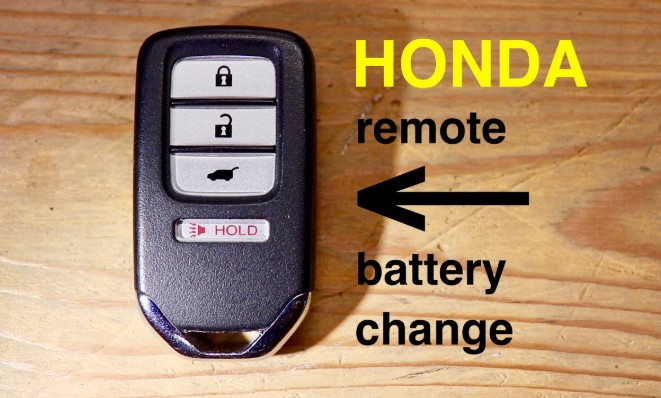
A dead key fob battery can turn a simple drive into a frustrating experience, especially when your Honda refuses to unlock or start remotely. The good news is that replacing the key fob battery takes only a few minutes and requires no special tools.
Every Honda key fob whether for a Civic, Accord, CR-V, or Pilot uses a small coin cell battery that powers its remote functions.
Over time, frequent use drains this battery, causing the range to shrink or buttons to stop responding. Swapping in a new battery restores full function instantly and saves an unnecessary trip to the dealership.
his guide walks through each step clearly so you can open the fob safely, identify the right battery type, and reinstall everything correctly. With a quick DIY fix, your Honda key fob will feel brand new again and ready for many more starts and unlocks.
How to Change Battery in Honda Key Fob?
A Honda key fob makes life easier by allowing drivers to lock, unlock, and start their car without touching the keyhole. But over time, the small battery inside can lose power.
Once the battery becomes weak, the remote starts to respond slowly or stops working completely. This can cause frustration, especially if it happens unexpectedly.
Changing the battery in a Honda key fob is an easy task that anyone can do at home. The process takes less than five minutes and requires only basic tools.
No need for a dealership visit or special knowledge. This step-by-step guide explains everything in simple language, from signs of a weak battery to testing your key fob after replacement.
Signs That Your Honda Key Fob Battery Needs Replacement
A weak key fob battery often gives clear warnings before it dies. Paying attention to these signs helps avoid sudden problems.
-
Reduced Range: The key fob works only when standing close to the car instead of from a distance.
-
Slow Response: Buttons take longer to react when locking or unlocking doors.
-
Dashboard Warning: Some Honda models display a message such as “Keyless Remote Battery Low.”
-
No Signal: The car doesn’t respond to any button presses at all.
-
Unreliable Start: For push-start vehicles, the engine may not recognize the key fob signal.
Once these signs appear, it’s best to replace the battery soon.
Tools and Materials Needed
Before beginning, make sure to have everything ready. This helps prevent losing small parts or damaging the key fob.
-
Small flathead screwdriver or coin
-
New CR2032 or CR2025 battery (depends on model)
-
Soft cloth or paper towel
-
Small bowl or tray to keep parts safe
Understanding the Honda Key Fob Design

Most Honda key fobs share a similar design, though small details may vary by model and year. Older models usually have a simple shell with a screw or clip.
Newer smart key systems (used in Civic, Accord, CR-V, and Pilot) have a slot to release the internal key.
Inside the fob, you’ll find:
-
A coin-cell battery (CR2032 or CR2025)
-
A plastic circuit holder
-
Metal contacts that touch the battery
Knowing how these parts fit together helps prevent mistakes during reassembly.
Step-by-Step Guide to Change the Battery
Step 1: Remove the Metal Key
Locate the small release button on the side or back of your fob. Press it and pull out the metal key. Set it aside in a safe place.
Step 2: Open the Fob Case
Find the small notch along the seam of the fob. Insert a flathead screwdriver or coin into the slot. Twist gently until the two halves separate. Avoid using too much force, as this can crack the plastic shell.
Tip: Wrap the screwdriver tip with a cloth to prevent scratches.
Step 3: Take Out the Old Battery
Inside, you’ll see a small circular battery. Carefully lift it out using your screwdriver or fingertip. Note the direction of the positive (+) side. It usually faces upward.
Step 4: Insert the New Battery
Place the new battery in the same position. Make sure it lies flat and the positive side faces the correct direction. If placed wrong, the fob won’t work.
Step 5: Snap the Case Back Together
Align both halves and press firmly until you hear a click. The case should fit tightly without gaps.
Step 6: Reinsert the Metal Key
Slide the metal key back into its slot until it locks in place.
Step 7: Test the Key Fob
Try pressing the lock and unlock buttons from a few steps away. The lights should flash and doors should respond immediately. For push-start vehicles, check that the engine starts smoothly.
Extra Tips for Battery Replacement
-
Handle the battery by the edges to avoid leaving fingerprints.
-
Use a dry, clean cloth to wipe the inside of the fob before inserting the new battery.
-
Always use a fresh, brand-new battery. Old or used ones may have low power even if unused.
-
Do not mix different battery brands or types.
-
Store extra batteries in a cool, dry place.
Common Honda Key Fob Battery Types
Most Honda key fobs use one of these batteries:
| Honda Model | Year Range | Battery Type |
|---|---|---|
| Honda Civic | 2016–2025 | CR2032 |
| Honda Accord | 2013–2025 | CR2032 |
| Honda CR-V | 2012–2025 | CR2032 |
| Honda Pilot | 2016–2025 | CR2032 |
| Honda Odyssey | 2014–2025 | CR2025 |
| Honda Fit | 2008–2020 | CR1616 |
| Honda HR-V | 2016–2025 | CR2032 |
Always check your owner’s manual or look at the old battery for confirmation.
Safety Precautions
-
Keep batteries out of reach of children and pets.
-
Avoid touching both battery sides to prevent short circuits.
-
Never use sharp metal objects to pry out the battery.
-
Dispose of used batteries properly through recycling bins or electronics stores.
Troubleshooting After Replacement
If your key fob still doesn’t work after replacing the battery, try these steps:
-
Check Battery Direction: Make sure the positive side is facing up.
-
Clean the Contacts: Use a dry cloth to remove any dirt or corrosion.
-
Try Another New Battery: Sometimes the first one may be faulty.
-
Check the Buttons: Ensure they aren’t jammed or damaged.
-
Reprogram the Fob: Rarely, some Honda models may need re-syncing with the car. Visit a dealer if this happens.
FAQs
1. How often should I change my Honda key fob battery?
Usually every 2–3 years. Frequent use or hot weather may shorten battery life.
2. Can I use a CR2025 instead of a CR2032?
No, they are similar in shape but not thickness. Always use the same type your fob came with.
3. How can I open the case without damaging it?
Use gentle pressure and twist slowly. Wrapping the screwdriver tip in tape helps prevent scratches.
4. Do I need to reset or program the fob after changing the battery?
In most cases, no. It should work immediately after replacing the battery.
5. What should I do if I lose the small metal key?
Visit a Honda dealership. They can cut a new one using your car’s VIN number.
Conclusion
Changing the battery in a Honda key fob is one of the simplest car maintenance tasks. It requires no special tools, no dealership visit, and only a few minutes of your time.
A fresh battery brings your key fob back to full strength, ensuring smooth locking, unlocking, and engine start every day. With this guide, anyone can handle the process confidently and safely.