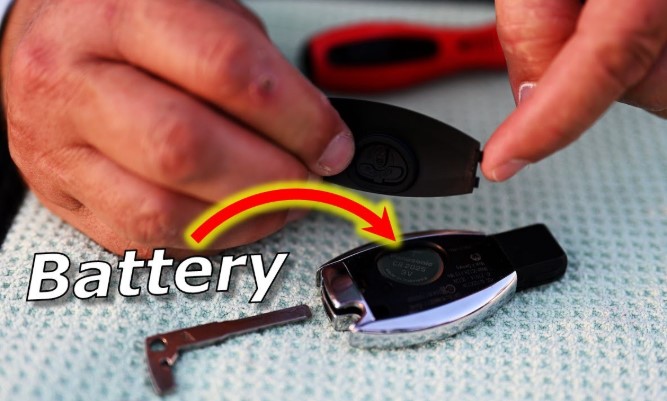
A Mercedes key fob does more than unlock doors it defines convenience and luxury in everyday driving. Yet, even the most advanced key fobs lose power over time, leaving you frustrated when the buttons stop responding.
A weak or dead battery can make your vehicle’s remote entry system unreliable, but replacing it takes only a few minutes and requires no special tools. The process is simple once you know where to start.
Each Mercedes model uses a slightly different key fob design, yet the replacement steps follow a similar pattern. Knowing how to replace the battery keeps your key fob performing at its best and saves you from unnecessary dealership visits.
This guide walks you through the exact steps to change the battery in your Mercedes key fob quickly and correctly, helping you restore full functionality without breaking a sweat.
How to Change Battery in Mercedes Key Fob?
A Mercedes key fob is more than just a car key it’s a small but powerful device that connects you to your car’s comfort and security features.
It lets you lock or unlock the doors, open the trunk, and even start the engine without inserting a key. Over time, the battery inside your key fob begins to lose power. You may notice slower response, reduced range, or no signal at all.
Replacing the battery on your own can save time and money. The process is simple, safe, and takes less than five minutes.
With the right tools and a bit of care, anyone can do it at home. This detailed guide explains each step clearly so you can restore your key fob’s full function quickly.
Understanding Mercedes Key Fob Types

Not all Mercedes key fobs look the same. The brand has introduced different versions over the years, and each type opens slightly differently. Knowing your key fob type helps you follow the correct steps.
1. Chrome Key Fob (Newer Design)
This design has a smooth chrome or silver border around the edges. It feels more premium and often comes with newer Mercedes models. It usually takes two CR2025 batteries.
2. Smart Key Fob (Older Design)
This version has a black plastic body without the silver trim. It’s simpler and thicker in shape. Most of these fobs take one CR2025 or CR2032 battery.
Check your key fob design before starting so you can choose the correct method below.
Tools and Materials You Need
-
A small flathead screwdriver or coin
-
A new CR2025 or CR2032 battery (depending on your model)
-
A soft cloth or tissue to protect the fob’s surface
-
Good lighting to see small details clearly
Step-by-Step: Changing the Battery in a Chrome Mercedes Key Fob
Step 1: Remove the Key Insert
Locate the small silver button on the end of the fob. Press it to release the metal key insert. Pull it out gently and keep it aside.
Step 2: Open the Battery Compartment
You’ll see a small notch near the back of the fob. Insert the tip of the key insert or a flathead screwdriver into the notch. Twist lightly to lift the battery cover. Be gentle avoid scratching the chrome surface.
Step 3: Take Out the Old Batteries
Remove the old batteries using the screwdriver’s tip or your fingernail. Check the battery type and note the “+” side (positive side).
Step 4: Insert the New Batteries
Place the new batteries into the slots with the “+” side facing up. The batteries should sit flat and snug.
Step 5: Close the Cover
Push the cover back into place until it clicks. Reinsert the metal key insert.
Step 6: Test the Key Fob
Press the lock or unlock button. The red LED light should glow. Try using it near your car to confirm that it works.
Step-by-Step: Changing the Battery in a Smart (Plastic) Mercedes Key Fob
Step 1: Remove the Key Blade
Press the small black button on the fob and pull out the key blade.
Step 2: Open the Back Cover
Insert the tip of the key blade or a flat screwdriver into the open slot at the back. Twist it carefully until the back cover pops off.
Step 3: Replace the Battery
Remove the old battery and check its model. Place a new CR2025 or CR2032 battery with the positive side facing up. Make sure it fits tightly.
Step 4: Reassemble the Key Fob
Snap the cover back into position. Slide the metal key blade back into place.
Step 5: Test Your Key Fob
Press the buttons to make sure everything works. The LED light should blink, confirming a good battery connection.
Important Tips for Best Results
-
Check Battery Type: Always check the old battery before buying a new one. The correct number (CR2025 or CR2032) is printed on it.
-
Replace Both Batteries: If your key fob uses two batteries, replace both at once for balanced performance.
-
Avoid Touching Battery Surface: Natural oils from your fingers can affect battery life. Hold batteries by the edge or use a cloth.
-
Use Quality Batteries: Choose trusted brands like Panasonic, Duracell, or Energizer for long-lasting power.
-
Dispose of Old Batteries Properly: Take them to a recycling center or a local collection point.
Signs That Your Mercedes Key Fob Battery Is Weak
-
The car takes longer to respond when pressing buttons.
-
The fob works only at a short distance.
-
The red LED light becomes dim or stops lighting up.
-
The car does not start even when the key is inside.
-
You see a “Key Battery Low” message on your dashboard.
If you notice one or more of these signs, replace the battery soon to avoid getting locked out of your car.
Troubleshooting After Battery Replacement
No Response After Changing Battery:
Make sure the batteries are installed with the correct side facing up. The positive side should face outward.
Weak Signal Even After Replacement:
Check that the battery is new and from a reliable brand. Old batteries, even unused ones, can lose power if stored too long.
Fob Still Not Working:
Try holding the key fob closer to the start button or door handle. If it still doesn’t work, the fob might have an internal issue. Visit a certified Mercedes service center for help.
FAQs
Q1: How often should I replace my Mercedes key fob battery?
Most key fob batteries last about 2 to 3 years. If your car starts showing weak signal signs, replace it sooner.
Q2: Can I use CR2032 instead of CR2025?
They look similar, but the CR2032 is slightly thicker. Always use the same type that came with your fob for the best fit.
Q3: Will I lose my car’s settings after changing the battery?
No, your car’s memory and pairing with the key fob stay safe. The new battery only restores power.
Q4: Is it safe to open the key fob myself?
Yes, as long as you follow the steps carefully and use gentle pressure. Avoid using sharp tools that can damage the fob.
Q5: How can I tell if my Mercedes key uses one or two batteries?
Open the fob or check your car’s manual. Newer chrome-style keys usually use two CR2025 batteries, while older plastic models use one.
Conclusion
Changing the battery in a Mercedes key fob doesn’t require special tools or expert help. It’s a quick process that restores your key’s signal and ensures your car responds properly.
Whether you have the chrome or plastic version, a few simple steps are all it takes to bring your key fob back to life. Keep a few spare batteries in your car or at home, and you’ll never have to worry about being locked out again.