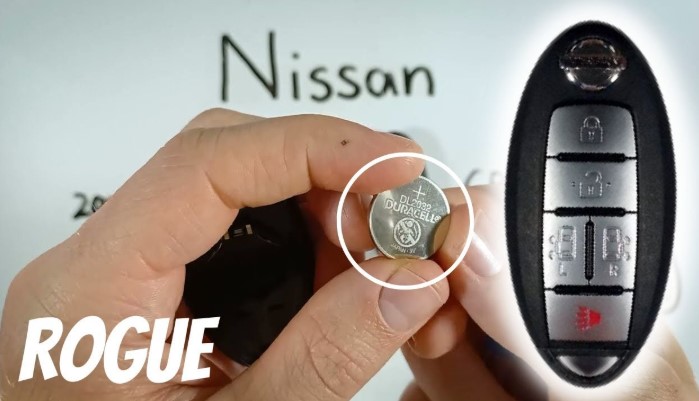
A Nissan key fob makes daily driving effortless until the battery starts to die. Suddenly, the doors refuse to unlock remotely, or the push-start button stops responding.
Replacing the key fob battery is far easier than most drivers expect and takes only a few minutes. With just a small flathead screwdriver and the right battery, your key fob can work like new again.
Understanding this simple process saves both time and a trip to the dealership. Every Nissan model uses a slightly different fob design, but the basic replacement steps remain similar across most versions.
Learning how to open the fob carefully, remove the old battery, and insert a fresh one restores full functionality instantly.
This small maintenance task keeps your Nissan key fob reliable and ensures uninterrupted convenience every time you start or unlock your car.
How to Change Battery In Nissan Key Fob?
A Nissan key fob makes daily driving easy. It locks and unlocks doors, opens the trunk, and starts the engine all without touching the key.
But after some time, the small battery inside the fob starts losing power. The signals get weaker, and the buttons stop responding. That’s a clear sign the battery needs to be replaced.
Changing the key fob battery is not difficult. It takes only a few minutes, no special tools, and a bit of care. This guide explains every step in simple words so that anyone even a beginner can follow it easily.
Why the Key Fob Battery Matters?
The Nissan key fob runs on a tiny coin-type lithium battery. This battery powers the signal that talks to your car’s receiver.
Without it, your key fob can’t send commands to lock, unlock, or start the car. A weak battery may still work from a short distance, but a completely dead one will not work at all.
A strong battery keeps your key fob responsive and prevents sudden issues, especially when you’re in a hurry.
Replacing it at the right time saves you from being locked out or stuck with a car that won’t start.
Signs of a Weak Nissan Key Fob Battery

Recognizing early warning signs helps you act before the battery dies completely. Common signs include:
-
Reduced range when pressing buttons.
-
Buttons need extra pressure to respond.
-
Delay in locking or unlocking the doors.
-
Push-start button not detecting the key easily.
-
A “Key Battery Low” message appearing on the dashboard.
If you notice any of these, it’s time to replace the battery.
What Type of Battery Does a Nissan Key Fob Use?
Most Nissan key fobs use either a CR2032 or CR2025 coin battery. Both are round lithium batteries found in watches, calculators, and other small electronics.
You can confirm the correct type by:
-
Checking the old battery for its printed code (e.g., CR2032).
-
Looking in your vehicle’s owner’s manual.
-
Searching by car model and year online.
For example:
-
Nissan Altima, Rogue, and Sentra usually use CR2032.
-
Older models like the Versa may use CR2025.
Tools You’ll Need
Before you begin, prepare a few basic items:
-
A new CR2032 or CR2025 battery.
-
A small flathead screwdriver, plastic pry tool, or coin.
-
A clean surface or soft cloth to protect the fob from scratches.
Step-by-Step Guide to Change the Nissan Key Fob Battery
Step 1: Remove the Mechanical Key
Most Nissan fobs have a small button or latch on the back. Press or slide it while pulling out the small metal key inside. Set it aside for later.
Step 2: Open the Key Fob Case
Find the small seam or notch where the two halves of the fob meet. Insert a flathead screwdriver or coin gently into this gap.
Twist slightly until the case begins to open. Do not force it too hard, or you may crack the plastic. Once loosened, separate the two halves carefully with your hands.
Step 3: Locate and Remove the Old Battery
Inside, you’ll see a small round coin battery. Note its position before removing it especially which side faces up. Use your tool or fingernail to lift the battery from its slot. Avoid touching the metal contacts.
Step 4: Insert the New Battery
Take the new battery and place it in the same position as the old one. The side marked with “+” should face upward. Make sure it fits snugly into the holder without wobbling.
Step 5: Reassemble the Key Fob
Align the two halves of the key fob. Press them together until they snap firmly into place. Reinsert the mechanical key back into its slot.
Step 6: Test the Key Fob
Press the lock and unlock buttons to make sure they work. Step a few feet away from your car to check the signal strength. If it responds quickly, the replacement was successful.
Common Mistakes to Avoid
-
Using the wrong battery type: Always check the number printed on your old battery.
-
Forcing the case open: Gentle pressure is enough. Too much force can break the casing.
-
Placing the battery upside down: The positive side (+) must face the correct direction.
-
Touching the contacts: Oil from fingers can reduce performance. Use clean, dry hands.
-
Not testing the fob after replacement: Always check before driving away.
Extra Care Tips for Your Nissan Key Fob
-
Keep the key fob away from water and strong magnets.
-
Avoid dropping it or exposing it to high heat.
-
Replace the battery every 2 to 3 years for best performance.
-
Clean the surface with a soft dry cloth; avoid liquids or sprays.
FAQs
1. What kind of battery does a Nissan key fob use?
Most use a CR2032 or CR2025 coin battery. Always confirm by checking your old battery or owner’s manual.
2. How long does a key fob battery last?
On average, two to three years under normal use. It can vary depending on temperature and frequency of use.
3. Do I need to reprogram my Nissan key fob after changing the battery?
No. The programming stays stored inside the key fob’s chip. Replacing the battery does not affect it.
4. Why does my key fob still not work after replacing the battery?
The battery might be installed incorrectly or could be defective. Double-check the placement or try another new battery.
5. Can I drive my car with a dead key fob battery?
In most Nissan models, you can still start the car by pressing the key fob against the start button. This uses a backup RFID chip that doesn’t need battery power.
6. How often should I replace my Nissan key fob battery?
Replacing it once every two years keeps it reliable and avoids sudden failures.
Conclusion
Replacing a Nissan key fob battery is a simple but important task. The whole process takes less than ten minutes and requires no special skills.
A fresh battery ensures your remote works smoothly, giving quick access to your car and reliable push-button starts.
Regular battery changes keep your Nissan key fob ready whenever you need it no stress, no delay, just smooth daily driving.