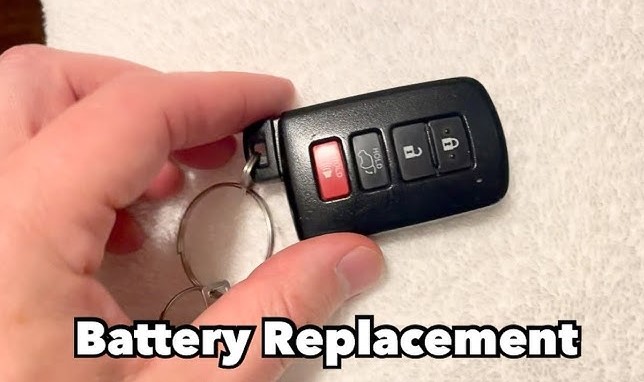
A weak Toyota key fob battery can turn simple tasks like unlocking your car or starting the engine into a hassle. A quick battery change restores full functionality and saves you from unexpected lockouts.
Most Toyota key fobs use a small coin-style battery, and replacing it takes only a few minutes with minimal tools. The process involves opening the key fob carefully, swapping the old battery for a fresh one, and reassembling it securely.
Regular maintenance keeps your key fob performing smoothly and extends its lifespan. Neglecting a low battery can cause signal issues or complete failure, which might require costly reprogramming.
Keeping a spare CR2032 or CR2016 battery handy ensures you stay prepared. A simple DIY replacement not only saves time and money but also gives peace of mind knowing your Toyota’s smart access system works flawlessly every time you hit the road.
How to Change Battery In Toyota Key Fob?
A weak or dead Toyota key fob battery can turn a small problem into a daily frustration. The buttons stop working, the signal weakens, and soon the fob stops responding altogether.
Many drivers think this issue needs a dealer visit, but the truth is simpler. Replacing the battery yourself is quick, safe, and inexpensive. It takes less than ten minutes, and you only need a few basic tools.
Every Toyota model uses a slightly different key fob design, but the replacement process remains mostly the same. This guide walks through each step clearly so anyone can do it at home, even without experience.
What You Need Before Starting?
Gather everything before starting so you don’t lose small parts or damage the case.
Tools and items needed:
-
Small flathead screwdriver or coin
-
New coin cell battery (usually CR2032 or CR2016 type)
-
A soft cloth or towel to protect the surface
-
Optional: plastic pry tool (to avoid scratching)
How to identify your battery type:
Open your key fob and look at the number printed on the old battery. Most Toyota key fobs use CR2032, but smaller fobs, like those for the Tacoma or older Corolla models, may use CR2016. Matching the correct size and voltage (3V) ensures proper performance.
Step-by-Step Guide to Replace the Battery

Step 1: Remove the Mechanical Key
Every Toyota key fob has a small metal key hidden inside. Press the release button on the back of the fob and pull out the mechanical key. Set it aside safely. This step exposes the seam where the key fob opens.
Step 2: Find the Opening Slot
Look along the side or near the key slot. You’ll see a small groove or notch. This is where you’ll insert your tool to pry the case open. Toyota designs this slot to prevent cracking the fob if opened correctly.
Step 3: Open the Key Fob Case
Insert the flathead screwdriver or plastic pry tool into the slot. Gently twist it until you feel the two halves separate. Do this slowly to avoid snapping any plastic clips. You should hear a soft pop as it opens. Once open, place both halves on a clean, flat surface.
Step 4: Remove the Old Battery
Inside, you’ll see a small circular battery seated in a holder. Before removing it, notice which side faces up. Usually, the positive (+) side faces upward.
Use your screwdriver or a fingernail to lift the battery out carefully. Avoid touching the metal contacts directly to prevent bending or residue buildup.
Step 5: Clean the Battery Compartment
Use a soft cloth to wipe away any dust or dirt. Even a small piece of debris can stop the battery from sitting correctly. If there’s any sign of corrosion, gently clean it with a cotton swab dipped in rubbing alcohol.
Step 6: Insert the New Battery
Take your new CR2032 or CR2016 battery and align it in the same position as the old one. Make sure the positive (+) side faces upward. Press it gently until it clicks or sits flat in the holder. The battery should fit snugly without forcing.
Step 7: Reassemble the Key Fob
Line up both halves of the key fob case. Press them together firmly until you hear a click. Check that the edges are sealed all around. Then slide the mechanical key back into its slot.
Step 8: Test the Key Fob
Stand close to your Toyota and press the lock or unlock button. The doors should respond immediately. If it doesn’t work, remove the battery again and double-check the position. You can also try a different new battery in case the first one was weak.
Extra Care Tips
-
Always handle coin batteries with dry, clean hands. Moisture or oil can shorten battery life.
-
Do not press too hard when closing the fob to avoid damaging the circuit board.
-
Keep spare batteries at home, especially if you have more than one Toyota.
-
Store old batteries safely away from children and pets before recycling.
-
If your key fob has water damage or corrosion, replacing the battery may not fix it. In that case, contact a Toyota service center for help.
Toyota Models and Common Battery Types
| Toyota Model | Common Battery Type | Typical Lifespan |
|---|---|---|
| Corolla | CR2032 | 2–3 years |
| Camry | CR2032 | 2–3 years |
| RAV4 | CR2032 | 2–4 years |
| Highlander | CR2032 | 2–3 years |
| Tacoma | CR2016 or CR2032 | 2 years |
| 4Runner | CR2032 | 2–3 years |
| Prius | CR2032 | 2–3 years |
| Sienna | CR2032 | 2–3 years |
Always verify with your vehicle’s manual before buying replacements.
Signs You Need a New Key Fob Battery
-
The range becomes shorter; you need to stand closer to the car.
-
Buttons require multiple presses before responding.
-
The light on the fob appears dim or stops flashing.
-
The car fails to start with push-button ignition, even though the key is nearby.
Replacing the battery at the first sign of weakness helps avoid complete failure.
FAQs
Q1: Can I replace the battery without tools?
Yes, some key fobs can open with your fingernails or a coin, but a small flat screwdriver makes it easier and safer.
Q2: Why does my Toyota key fob drain batteries quickly?
Constant button pressure or exposure to extreme temperatures can drain the battery faster. Keep the fob in a cool, dry place.
Q3: Will I need to reprogram my key fob after battery replacement?
No, most Toyota key fobs don’t lose their programming. The car should recognize it right away.
Q4: Can I use rechargeable coin batteries?
No, rechargeable types can cause performance issues. Always use standard 3V lithium coin batteries.
Q5: What if the key fob still doesn’t work after changing the battery?
Check the metal contacts for dirt or damage. If the issue remains, the fob might need service or replacement.
Conclusion
Changing the battery in a Toyota key fob is simple and cost-effective. A few careful steps restore full function and keep your daily routine smooth.
Keeping a spare battery ready can save time and stress later. A working key fob means easy entry, quick starts, and peace of mind every time you drive.