start. Modern vehicles rely heavily on these tiny devices, and a weak battery can quickly disrupt your routine. The good news is that swapping the battery takes only a few minutes and requires minimal tools.
A fresh battery restores full signal strength, keeps remote functions responsive, and saves you from last-minute frustration. Understanding your key fob’s design is the first step to a smooth replacement process since each model can vary slightly.
A small flathead screwdriver, a steady hand, and the right replacement battery are usually all you need. With the right approach, anyone can handle this quick DIY fix.
This guide breaks down every step so you can change your key fob battery confidently and keep your car’s convenience fully functional.
How to Change Key Fob Battery?
A key fob makes daily driving easy. It locks, unlocks, and even starts the car with a single press. But when the battery inside dies, that convenience disappears fast.
The buttons stop working, and the range gets shorter until nothing happens at all. It feels like a big problem, but it’s actually one of the easiest car fixes you can do yourself.
Changing the key fob battery doesn’t need tools from a workshop or expert help. With the right steps and a little care, anyone can do it at home in just a few minutes.
This guide explains everything clearly what tools you need, how to open the fob, and how to replace the battery safely without breaking anything.
Why the Key Fob Battery Matters?

A key fob works through a small radio signal that connects to your car’s receiver. That signal comes from the power stored in its tiny coin-shaped battery.
Once the power weakens, the signal becomes too weak to reach your car. You might have to press the button several times or stand very close to the vehicle for it to work.
That’s your first warning sign. Replacing the battery early prevents full failure, which can save you from being locked out or unable to start your engine especially with push-start systems.
What You’ll Need?
Before starting, prepare a few basic tools and materials:
-
New battery – Most key fobs use a CR2025 or CR2032 lithium coin battery. Check your old one or your car manual to confirm the exact type.
-
Small flathead screwdriver or coin – For prying open the fob.
-
Soft cloth or towel – To protect the fob and prevent scratches.
-
Clean hands or gloves – Oils or dirt can reduce battery contact quality.
Make sure your working area is bright and clean. Small parts can roll away easily.
Step 1: Find the Battery Slot
Every key fob has a small notch, groove, or seam that allows access to the inside. Some fobs have a hidden release button near the key ring area. Others may require removing a mechanical key first to reveal the slot.
Check the edges carefully. You’ll see a tiny gap designed for a coin or screwdriver tip. Never force it. Use gentle pressure to avoid cracking the plastic.
Step 2: Open the Key Fob Carefully
Place the key fob on a soft cloth. Insert the screwdriver or coin into the gap. Twist slightly until the halves separate. You should hear a small click. Slowly pull apart the two sides.
Some car brands, like Toyota or Honda, include a small screw that must be removed first. Keep that screw in a safe spot so it doesn’t get lost.
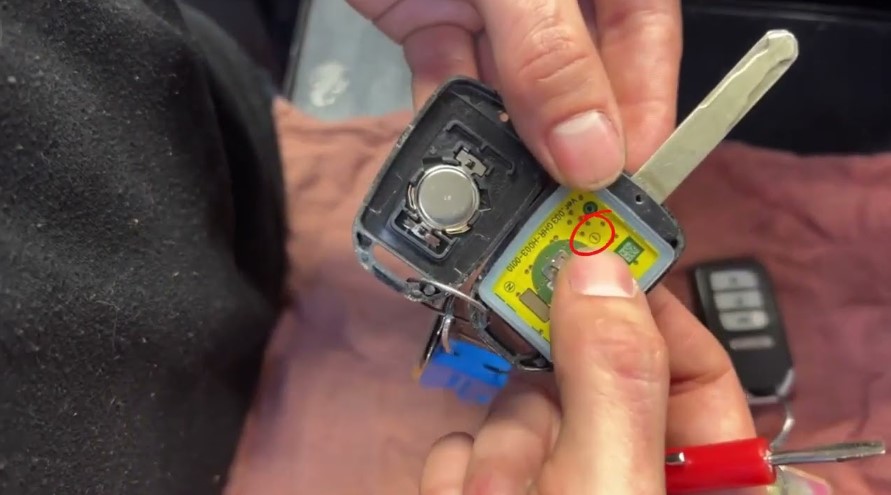
Once open, you’ll see the small coin battery sitting in a round slot on the circuit board.
Step 3: Remove the Old Battery
Take a moment to look at the way the battery sits inside. The positive side usually faces up, but some models are reversed. Noting the direction before removing it helps avoid mistakes later.
Use your fingernail, a small plastic tool, or the edge of your screwdriver to lift it out gently. Do not bend the metal connectors underneath they hold the battery in place and help transfer power.
Dispose of the old battery properly. Never throw it in regular trash. Coin batteries can leak harmful chemicals.
Step 4: Insert the New Battery
Now take your new battery and check that it matches the voltage and size of the old one. Align it exactly the same way positive (+) side up, negative (-) side down, depending on your model.
Slide the new battery under the metal tabs or contacts until it fits snugly. You should feel a soft click or firm placement. Avoid touching both sides of the battery with your fingers for too long, as oils can interfere with the contact points.
Once it’s seated firmly, the power is ready to flow again.
Step 5: Close the Key Fob
Before closing the fob, inspect the inside for any dust or dirt. A soft brush or cotton swab can clean it gently. Then align both halves of the casing properly.
Press the edges together until you hear a click. For screw-type fobs, replace and tighten the screw securely.
Check for gaps or misalignment to ensure it’s sealed tightly this helps protect it from moisture and dirt.
Step 6: Test the Key Fob
Stand near your car and press the lock or unlock button. The car lights should blink, or the locks should click. Try the trunk and panic buttons too. All should respond quickly.
If nothing happens, open the fob again and double-check the battery’s direction and position. Also, make sure the contacts are clean and not bent.
Extra Maintenance Tips
-
Keep your key fob dry. Water or humidity can damage the circuit inside.
-
Avoid dropping it. Hard impacts may loosen the battery or break internal parts.
-
Use only branded batteries from trusted stores. Low-quality batteries drain faster and can leak.
-
If your key fob stops working even with a new battery, the problem may be with the internal circuit board or signal transmitter.
Common Battery Types for Key Fobs
Always confirm with your owner’s manual before buying a new one.
FAQs
1. How often should I change my key fob battery?
Most batteries last around 2–3 years. Heavy use, cold weather, or low-quality batteries can shorten that time.
2. What are signs my key fob battery is dying?
Buttons respond slowly, range becomes shorter, or your car doesn’t unlock even when close. The red light (if your fob has one) may also dim.
3. Can I use a different brand of battery?
Yes, as long as it’s the same size and voltage. Just choose a reliable brand for longer life.
4. Do I need to reprogram my key fob after changing the battery?
Usually not. Most fobs work immediately once the new battery is installed.
5. What should I do if my fob still doesn’t work?
Check the battery placement again. If it’s correct and still fails, the internal chip might be damaged. Visit a dealership or locksmith for help.
Conclusion
Replacing a key fob battery is a simple fix that saves time and money. A few careful steps keep your car’s remote system running smoothly without expert help.
Always use the correct battery type and handle the parts gently. A working key fob makes life easier no stress, no delays, just a quick press to start your journey.