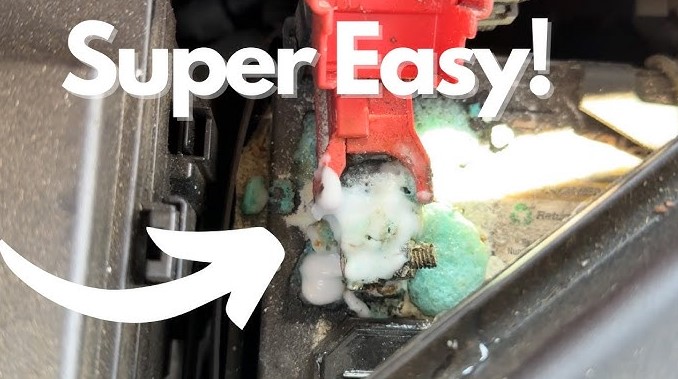
A sluggish start or flickering dashboard often points to dirty battery terminals. Corrosion buildup blocks the electrical flow your car depends on, leaving you stuck with frustrating power issues.
A clean connection keeps your battery healthy, your engine starting smoothly, and your electronics performing as they should. Grime, oxidation, and acid residue may seem minor, but they quietly eat away at performance over time.
A quick cleaning routine restores that lost power and prevents costly repairs down the road. With just a few basic tools like a wrench, brush, and baking soda you can bring your battery back to top condition in minutes.
Clear terminals don’t just boost reliability; they extend battery life and improve overall vehicle efficiency. Stay ahead of trouble by giving your battery the simple care it deserves and enjoy a dependable drive every time you turn the key.
How to Clean Battery Terminals?
A car battery is the heart of your vehicle’s electrical system. It powers the starter, lights, radio, and more. Over time, the battery terminals can get covered in dirt, grease, and corrosion.
That buildup can block electricity from flowing smoothly, making your car hard to start or leaving it dead altogether. Cleaning battery terminals is not just about looks it keeps the power flowing strong and protects your battery’s life.
The process is simple, safe, and requires only a few basic tools. This guide will walk you through every step in detail, so even first-time car owners can do it confidently.
Understanding Battery Terminal Corrosion
Battery terminals are the two metal posts on top or the side of your car battery. One is positive (+), and the other is negative (−). These terminals connect the battery to your car’s electrical system.
Over time, they can corrode due to chemical reactions between the metal, air, and battery acid. You might notice white, green, or blue powdery buildup on or around them.
Here’s what causes it:
-
Acid Leakage: Small leaks from the battery’s top can cause acid vapors to reach the terminals and form corrosion.
-
Overcharging: A faulty alternator can cause excess gas release, which leads to corrosion faster.
-
Moisture and Humidity: Damp air speeds up oxidation, especially in warm or coastal areas.
-
Poor Connection: Loose terminals create tiny sparks, which can also trigger corrosion.
Corrosion doesn’t just look bad it weakens the battery’s performance, reduces starting power, and can damage cables over time.
Tools and Materials You’ll Need

Before cleaning, make sure you have everything ready. Preparation keeps the process safe and easy.
You’ll need:
-
Safety gloves and glasses
-
Adjustable wrench or pliers
-
Baking soda
-
Warm water
-
Old toothbrush or wire brush
-
Small bowl or container
-
Clean cloth or rag
-
Petroleum jelly or terminal grease
-
Optional: battery terminal puller (for tight cables)
Step-by-Step Guide to Clean Battery Terminals
Step 1: Park Safely and Turn Everything Off
Park your car in a safe, well-lit area. Turn off the ignition and remove the keys. Make sure all lights and electronics are off. This step prevents accidental short circuits.
Step 2: Open the Hood and Inspect the Battery
Locate the battery under the hood. Most car batteries have plastic covers on top; lift them off to check the terminals.
Take a close look at the terminals and cables. If you see cracks, leaks, or swelling in the battery case, do not clean it. Replace the battery instead.
Step 3: Disconnect the Cables Properly
Always remove the negative (−) cable first. Loosen the nut with a wrench and gently twist the connector until it comes off. Then remove the positive (+) cable.
This order prevents accidental sparks and short circuits. Remember: negative off first, negative on last.
Step 4: Mix a Cleaning Solution
Combine one tablespoon of baking soda with one cup of warm water in a bowl. Stir until it dissolves. This mixture neutralizes acid and helps break down corrosion effectively.
Step 5: Apply the Cleaning Mixture
Dip your toothbrush or wire brush into the baking soda solution. Scrub the battery terminals and the cable connectors thoroughly.
If the buildup is thick, sprinkle dry baking soda directly on the terminals, then pour a small amount of water on top. You’ll see fizzing this means the acid is being neutralized. Keep scrubbing until the metal looks clean and shiny.
Step 6: Rinse and Dry
After cleaning, use a damp cloth soaked in clean water to wipe away all the residue. Make sure no baking soda or water is left on the terminals.
Use a dry towel or rag to wipe them completely dry. Moisture can cause more corrosion later, so be thorough here.
Step 7: Apply Protective Coating
Once dry, coat the terminals and cable ends with a small amount of petroleum jelly or special battery terminal grease.
This layer protects against moisture and air, preventing corrosion from forming again. A thin layer is enough too much grease can attract dirt.
Step 8: Reconnect the Cables
Attach the positive (+) cable first, then the negative (−) one. Tighten both with a wrench so they feel snug but not overly tight.
Wiggle the cables gently to check that they’re secure. Loose connections can cause your car to lose power unexpectedly.
Step 9: Test the Battery
Start your car and see how it responds. If it starts smoothly and the battery light on your dashboard stays off, the cleaning was successful.
If the engine struggles to start or the battery light remains on, you may need a deeper inspection or a new battery.
Extra Care and Maintenance Tips
Keeping your battery clean and healthy doesn’t take much effort. Try these habits to make it last longer:
-
Check the battery once a month for dirt or corrosion.
-
Keep the top of the battery dry and dust-free.
-
Avoid overcharging by making sure your alternator is working correctly.
-
Drive your car regularly to prevent the battery from draining.
-
Replace worn-out cables or loose clamps quickly.
-
Use protective battery terminal covers if your car didn’t come with them.
Small steps like these can save you money and prevent sudden breakdowns.
FAQs
1. Can I clean battery terminals with just water?
Water alone won’t remove corrosion well. Baking soda helps neutralize the acid and clean the metal properly.
2. How do I know if my battery is too corroded to clean?
If the terminals or cables are severely damaged, cracked, or crumbling, cleaning won’t help. It’s safer to replace the parts.
3. What happens if I remove the positive cable first?
Removing the positive cable first can cause a short circuit if your wrench touches metal. Always remove the negative one first for safety.
4. Is it safe to touch corrosion?
No. Corrosion contains acid and can irritate your skin or eyes. Always wear gloves and avoid direct contact.
5. How often should I clean my battery terminals?
Clean them every three to six months or anytime you notice white or green buildup.
6. Can I use soda like Coke to clean the terminals?
Yes, it works in a pinch because it contains mild acid, but baking soda and water are safer and cleaner to use.
Conclusion
Clean battery terminals keep your car starting strong and running smoothly. The process takes only a few minutes but prevents a lot of trouble later.
Regular cleaning stops corrosion, improves performance, and extends your battery’s life. Keep your tools ready, check your battery often, and give it the care it deserves. A clean connection today means a reliable start every time you turn the key.