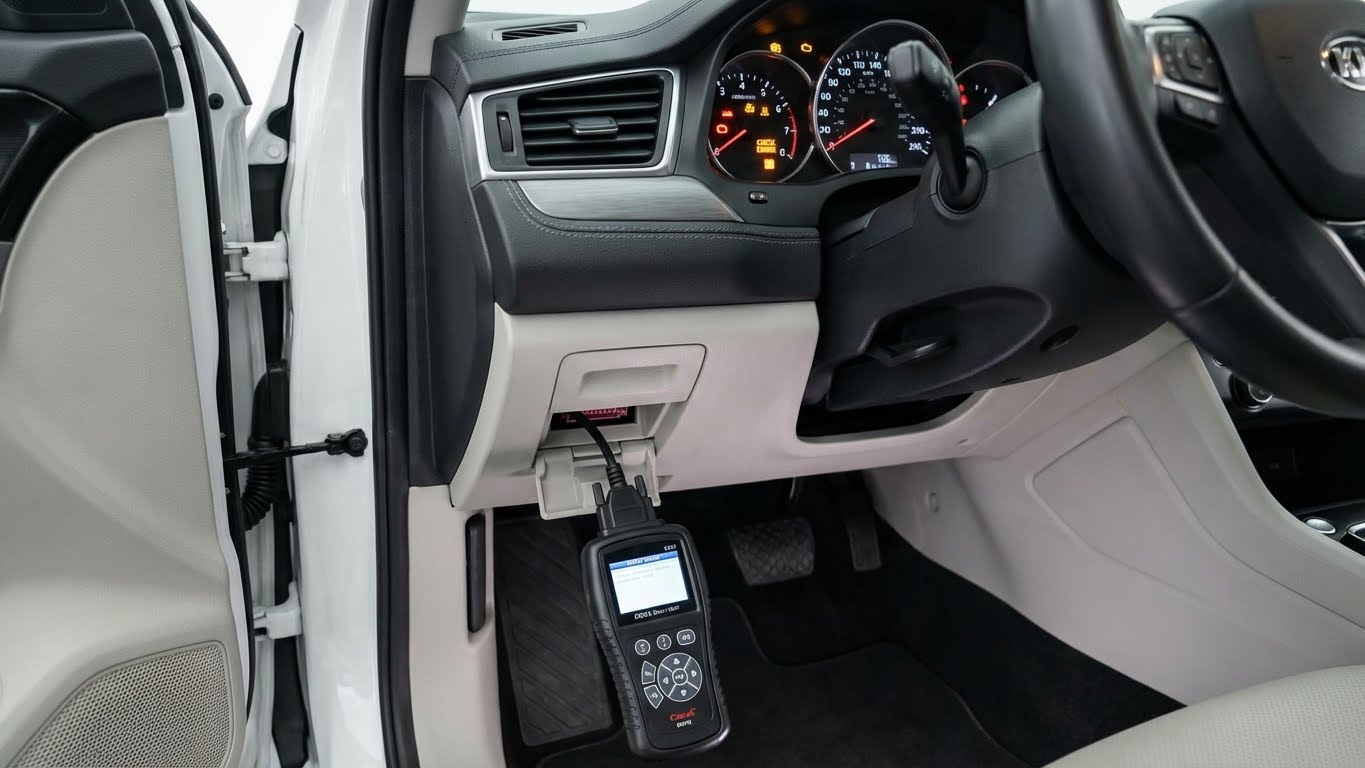
Using an OBD2 scanner at home is a simple way for car owners to check their vehicle’s health without visiting a mechanic. An OBD2 scanner plugs into your car’s diagnostic port to read trouble codes that help identify issues quickly. This makes it easier to understand why the check engine light is on and whether urgent repairs are needed.
Most cars made after 1996 have an OBD2 port, making this tool widely useful. The scanner connects directly to the car, and with a few easy steps, it displays error codes that point to specific problems. By learning to read these codes, users can save time and money by fixing minor issues themselves or deciding when professional help is necessary.
Knowing how to use an OBD2 scanner can give car owners more control over their vehicle’s maintenance. With basic setup and code interpretation, anyone can troubleshoot common problems and keep their car running smoothly. This guide will walk through the key steps to get started and make the most of this diagnostic tool at home.
Key Takeways
- An OBD2 scanner reads diagnostic trouble codes from most cars made after 1996.
- Users can identify vehicle issues by connecting the scanner and reading error codes.
- Basic knowledge of code interpretation helps with simple repairs and maintenance decisions.
What Is an OBD2 Scanner?

An OBD2 scanner is a device that connects to a vehicle’s onboard computer to read and clear trouble codes. It helps identify issues by accessing data from the car’s diagnostic system. This tool can show error codes, live sensor data, and other vehicle information. It is important for anyone who wants to do basic car diagnostics at home.
Common Uses and Functions
An OBD2 scanner reads Diagnostic Trouble Codes (DTCs) when the check engine light comes on. These codes point to specific problems with the engine, transmission, or other systems. The scanner can also display real-time data like engine temperature, RPM, and oxygen sensor output.
Users can clear error codes after repairs, which turns off the check engine light. Some advanced scanners go beyond basic codes and offer features like freezing frame data and readiness monitors for emissions tests. This makes the tool useful not just for finding problems but also for verifying fixes.
Types of OBD2 Scanners
There are three main types of OBD2 scanners:
- Code Readers: Basic devices that read and clear codes. They usually don’t show detailed info.
- Scan Tools: More advanced, these devices provide live data and additional diagnostics. Some can test components.
- Bluetooth/Wi-Fi Adapters: Small devices that connect wirelessly to smartphones or tablets. They use apps to display data and codes.
The choice depends on the user’s needs and budget. Simple code readers suit beginners, while mechanics might prefer scan tools with more features.
Benefits of Home Diagnostics
Using an OBD2 scanner at home saves time and money. It helps people spot problems early before they worsen and become costly repairs. Home diagnostics also reduce trips to the mechanic by giving clear information about the problem.
Additionally, this tool provides vehicle data that helps users understand their car better. It gives control over car maintenance and can improve safety by catching issues early. For DIY mechanics, the scanner is a helpful companion for fixing and maintaining vehicles.
Preparing to Use an OBD2 Scanner
Before starting, the user must know where to connect the scanner, confirm if their vehicle supports OBD2, and take safety steps to avoid damage or injury. These steps set the foundation to use the tool correctly and get accurate information.
Identifying the OBD2 Port Location
The OBD2 port is usually found under the dashboard on the driver’s side. Common spots include below the steering column, near the pedals, or around the fuse box area. It might be hidden behind a small plastic cover.
The port is rectangular with 16 pins arranged in two rows. Knowing this shape helps avoid confusion with other connectors. A flashlight might be useful to find it easily, especially in low light.
Checking the vehicle’s manual can also help locate the port quickly. Once found, the user should make sure the area is clean and accessible for the scanner to connect firmly.
Ensuring Vehicle Compatibility
OBD2 scanners work with most cars made in 1996 or later in the U.S. and similar model years in other regions. Cars built before 1996 may not support OBD2 protocols, preventing the scanner from working.
Users should verify the vehicle’s model year and check the manual or manufacturer website for OBD2 support. If the car uses an older system, a different diagnostic tool might be needed.
Some heavy-duty or electric vehicles might require special scanners or adapters. Confirming compatibility avoids wasted time and possible scanner errors.
Safety Precautions
Before using the scanner, the vehicle must be parked on a flat surface with the engine off. The key should be in the “off” or “accessory” position, depending on the scanner’s instructions.
The user should avoid touching the car’s electrical components or wires to prevent shocks or damage. Wearing gloves can add protection.
It is important to connect the scanner carefully and not force the plug into the port. After use, disconnect the scanner gently to avoid damaging the pins or port.
Keeping the vehicle’s manual nearby helps follow specific safety guidelines for that model.
Setting Up Your OBD2 Scanner
Before using an OBD2 scanner, it is important to properly connect the device, power your vehicle’s system, and ensure the scanner can communicate with the car. These steps are essential to access accurate diagnostic information.
Connecting the Scanner to Your Vehicle
The OBD2 port is usually located under the dashboard on the driver’s side. It may be near the steering column or just above the pedals. The port is trapezoid-shaped and should match the connector on the scanner’s cable.
To connect, firmly plug the scanner’s connector into the port. A snug fit is important to make a good electrical connection. No tools are needed for this step.
It is important not to force the plug if it does not fit easily. Checking the location in the vehicle’s manual can help if the port is hard to find.
Turning on the Ignition
Once the scanner is connected, the vehicle must be powered on to communicate with the OBD2 system. Most scans require the ignition to be in the “ON” position. This turns on the vehicle’s computer without starting the engine.
In some cases, the engine may need to be running for advanced diagnostics or live data monitoring. Check the scanner’s instructions to know when the engine should be started.
Turning the ignition only powers the dashboard lights and electronics. This allows the scanner to read fault codes and other data.
Establishing Device Communication
After powering the vehicle, the scanner will attempt to connect with the onboard computer. This process usually happens automatically within a few seconds.
Most scanners display a “connected” or “ready” message once communication is successful. If it does not connect, the user should check the cable, port, and ignition status.
Some scanners may require selecting the vehicle make, model, or year before reading codes. Follow device prompts carefully.
If communication fails repeatedly, restarting the vehicle and scanner can help reset the connection.
Reading and Interpreting Diagnostic Codes
To use an OBD2 scanner effectively, knowing how to read trouble codes and understand the data it provides is essential. This involves identifying what codes mean, checking live engine data, and decoding specific fault information to diagnose problems accurately.
Understanding DTCs
Diagnostic Trouble Codes (DTCs) are standardized codes that signal issues in various vehicle systems. Each code starts with a letter (P, B, C, or U) indicating the system affected: Powertrain, Body, Chassis, or Network. The following numbers explain the exact fault.
For example, P0301 means a misfire in cylinder 1. These codes help narrow down the fault without guessing. Some scanners show pending codes, which indicate a problem detected but not yet final. Clearing the codes resets the check engine light but should only be done after fixing the issue.
Resources like the OBD-II codes list offer detailed explanations for all codes.
Accessing Live Data Streams
Beyond codes, OBD2 scanners can display real-time data from sensors. This includes engine RPM, coolant temperature, oxygen sensor readings, and more. Watching these values helps pinpoint issues that codes alone might miss.
To see live data, the scanner must be connected while the car runs. Changes in sensor data during idling or acceleration reveal how the engine performs. For instance, fluctuating oxygen sensor readings might indicate exhaust or fuel problems.
This live stream is useful for monitoring repairs or ongoing issues visually, providing clues in real time.
Interpreting Code Definitions
Once codes appear, interpreting what they mean in context is crucial. Each code relates to specific vehicle components or systems. A “P” code is often linked to the engine or transmission, while “B,” “C,” and “U” codes target body systems, chassis, or communication faults.
A code like P0420 points to catalytic converter efficiency below threshold. Interpreting requires matching the code to symptoms and considering if the problem could be caused by another failing part.
Many scanners include brief code definitions, but a manual or online guide can provide deeper insight to aid accurate diagnosis.
For thorough information on diagnostics, trusted sources like NHTSA’s OBD page offer additional guidance.
Troubleshooting Common Car Issues
Using an OBD2 scanner helps reveal specific problems by reading error codes. It guides users to focus on key areas like the engine, emissions system, and warning lights. This makes it easier to decide what action to take next.
Identifying Engine Problems
The engine is one of the most common sources of trouble codes. When the scanner shows a code, it often points to specific engine parts like sensors, fuel systems, or ignition components. For example, codes starting with “P0” are usually engine-related.
A user should write down the code and look it up in the scanner’s manual or online database. This step explains what part has an issue and what might be wrong. Some common codes indicate problems like misfires, faulty oxygen sensors, or issues with the mass airflow sensor.
By targeting these issues, a user can decide whether a simple fix like replacing a sensor or a visit to the mechanic is required. Diagnosing early can prevent bigger engine damage.
Checking Emissions-Related Systems
Emissions systems keep the car running clean and meet legal regulations. OBD2 scanners often identify faults in systems like the catalytic converter, EVAP system, or oxygen sensors. Codes related to these systems usually begin with “P04” or “P04xx.”
If an emissions code appears, it signals a possible leak, sensor failure, or an inefficient catalytic converter. The user should focus on checking hoses, wiring, and sensor connections first. In many cases, cleaning or replacing a small part fixes the problem.
Failing to address emissions codes can cause a car to fail state inspections. Timely use of the scanner helps avoid this issue and keeps the car running properly.
Resetting Warning Lights
After inspecting and fixing the issue, the scanner allows users to clear the trouble codes. This resets dashboard warning lights, such as the check engine light. It is important to turn off the ignition before plugging in the scanner and then turning it back on to start code reading.
Once the repairs are done, most OBD2 scanners have a “Clear Codes” or “Erase” function. Using this clears the stored error codes and turns off the warning light.
If the light returns shortly after reset, it means the problem still exists or is recurring. This signals that further inspection is needed. Resetting lights without fixing the problem only hides the symptoms temporarily.
Performing Advanced Diagnostics at Home
To dig deeper into vehicle issues, a user can track real-time engine data and examine freeze frame information stored during fault events. These tools reveal more than just error codes, helping with precise troubleshooting.
Monitoring Vehicle Performance
An OBD2 scanner can show live data such as engine RPM, coolant temperature, oxygen sensor readings, and fuel system status. Watching these values while the engine runs helps identify problems like overheating, poor fuel mixture, or sensor failures.
Some advanced scanners offer graphing features that plot data trends over time. This visual aid makes it easier to spot irregular patterns. For example, fluctuating RPMs at idle could point to a vacuum leak.
Real-time data is especially useful during road tests. Mechanics or DIY users can monitor how the engine responds under load, throttle changes, or acceleration. This live feedback speeds up diagnosis and repair.
For more details on live data monitoring, the EPA’s guide on OBD2 data is helpful.
Analyzing Freeze Frame Data
Freeze frame data records specific engine conditions when a fault triggers the check engine light. It captures parameters like engine speed, coolant temperature, vehicle speed, and fuel trim at the time of trouble.
This snapshot is crucial because it shows the environment when the problem first happened. For example, it may show the engine was cold or idling, info that helps pinpoint intermittent or context-specific issues.
Accessing freeze frame data requires entering the diagnostic menu on the scanner after pulling codes. Reviewing these values alongside trouble codes allows for a clearer understanding of fault triggers. This can avoid unnecessary repairs.
Understanding freeze frame data is key to effective diagnostics. Additional info is available at OBD II Freeze Frame Data Explanation.
Best Practices for OBD2 Scanner Use
Using an OBD2 scanner correctly helps ensure accurate readings and extends the tool’s life. Proper care and keeping the scanner’s software up to date are essential for reliable diagnostics and smooth operation.
Maintaining Your Device
Regular maintenance of an OBD2 scanner prevents damage and improves performance. Users should store the scanner in a clean, dry place away from extreme temperatures. Avoid dropping the device or exposing it to water, as this can cause internal damage.
Check the connector pins regularly for dirt or corrosion. If any build-up is noticed, cleaning with a soft cloth or electronic contact cleaner can help maintain good connections. After use, disconnect the scanner carefully and avoid pulling on the cable to prevent wear or breakage.
Keeping the device’s battery charged (if it has one) or replacing it when needed is also important. A weak or dead battery can lead to incorrect readings or failure to power on.
Updating Scanner Software
Updating the scanner’s software is critical for accessing the latest vehicle data and diagnostic codes. Manufacturers often release updates to improve scanner functionality and compatibility with new car models.
Users should connect the scanner to a computer or Wi-Fi, depending on the model, to check for available updates. Download and install updates promptly following the manufacturer’s instructions to avoid errors during the process.
Failure to update software can result in missing new fault codes or incorrect code interpretation. Regular updates help maintain the scanner’s accuracy and can add new features for better diagnostics.
Limitations of Home OBD2 Diagnostics
Home OBD2 scanners provide valuable information but have clear limits. They can read and clear fault codes, which helps identify some problems quickly. However, they do not fix issues or explain every code in detail.
Many home scanners show generic trouble codes. These codes point to general areas but may not reveal the exact cause. For example, a code for an oxygen sensor could mean the sensor itself is faulty or a related part is causing the problem.
Some advanced features found in professional diagnostic tools are missing in home devices. These include live data streams, detailed freeze frame data, or special manufacturer-specific codes. Without these, detailed troubleshooting can be harder.
Potential risks exist when using cheap or low-quality OBD2 scanners. They might send incorrect commands or cause false readings. Reliable scanners paired with proper user knowledge reduce this risk.
Limitations at a glance:
| Feature | Home OBD2 Scanner | Professional Tool |
|---|---|---|
| Read basic trouble codes | Yes | Yes |
| Read manufacturer-specific codes | Usually no | Yes |
| Clear codes and reset lights | Yes | Yes |
| Real-time data monitoring | Limited | Extensive |
| Vehicle-specific diagnostics | Limited | Advanced |
Users should see home OBD2 diagnostics as a helpful first step. It gives clues but won’t replace expert diagnosis or repairs.
Additional Resources for DIY Car Care
Using an OBD2 scanner is a great start, but additional resources can help DIYers better understand their vehicles. There are many manuals, websites, and apps designed to make car care more accessible.
Owners should consider keeping a vehicle repair manual handy. These manuals provide detailed instructions for specific makes and models. They often include diagrams and step-by-step guides that complement the information from OBD2 scanner codes.
Online forums and websites also offer valuable support. Communities like Car Forums or Reddit’s r/MechanicAdvice allow users to ask questions and share experiences. These platforms help clarify what certain trouble codes mean and suggest possible fixes.
Mobile apps can enhance the OBD2 scanning experience. Apps like OBDLink or Torque connect to Bluetooth OBD2 scanners and show real-time data on smartphones. They often include code definitions and maintenance reminders.
Here is a simple table summarizing useful resources:
| Resource Type | Examples | Benefits |
|---|---|---|
| Repair Manuals | Haynes, Chilton | Step-by-step repair details |
| Online Forums | Car Forums, Reddit | Community advice and tips |
| Mobile Apps | OBDLink, Torque | Real-time diagnostics |
Taking advantage of these tools makes car maintenance clearer and less intimidating. They support the data found with OBD2 scanners and help users take more confident steps in DIY car care.
FAQs
Does the car need to be running to use an OBD2 scanner?
Usually, the car’s ignition should be turned to the ON position. Some scanners require the engine to be running, while others only need the ignition on. It is best to follow the specific instructions for the scanner being used.
Where is the OBD2 port located?
The OBD2 port is typically found under the dashboard, near the driver’s seat. It is a small, trapezoid-shaped connector designed for plugging in the scanner.
What kind of problems can an OBD2 scanner detect?
It reads trouble codes related to the engine, transmission, emissions, and other systems. These codes help identify issues like misfires, sensor failures, or emissions problems.
Can a beginner use an OBD2 scanner?
Yes. Most scanners are designed for easy use by beginners. They often come with instructions and display codes that can be looked up for clear explanations.
| Question | Answer |
|---|---|
| Does the car have to be running? | Ignition ON is usually enough |
| Where is the OBD2 port? | Under the dashboard, near the driver’s seat |
| What issues can it detect? | Engine, transmission, emissions problems |
| Is it beginner-friendly? | Yes, many scanners have simple instructions |
Can the scanner clear the check engine light?
Most scanners can clear codes and turn off the check engine light. However, the problem causing the light should be fixed to avoid it coming back.
Conclusion
Using an OBD2 scanner at home gives car owners a practical way to monitor their vehicle’s health. It helps identify problems early, saving time by avoiding guesswork. This tool supports better decision-making about repairs, whether a person wants to try fixing issues themselves or seek professional help.
The scanner is simple to use, even for beginners. By following basic steps, anyone can read fault codes, clear warning lights, and track maintenance needs. Regular use encourages better care for the vehicle and can prevent costly breakdowns.
Below are some key benefits of mastering an OBD2 scanner:
| Benefits |
|---|
| Quick diagnosis of issues |
| Reduced repair costs |
| Improved vehicle maintenance |
| Increased confidence in handling car problems |
By integrating the scanner into routine car care, users gain valuable information about their vehicle’s condition. This knowledge allows them to act faster and more efficiently when problems arise. The OBD2 scanner is a reliable tool to keep a car running smoothly.